Agile Poker adds a slim, standalone planning poker page to your WordPress site at a freely configurable URL (e.g. yourdomain.com/poker/). All the interaction logic runs in the browser (JavaScript); the PHP backend only stores the room state (title, card set, participants, votes) in two tables of its own and provides a small REST API.
Features:
- Create a room at its own, configurable URL
- Share the room link, join directly without logging in
- Your name is remembered in the browser (localStorage)
- Cards are only shown to everyone after "Reveal" (with confirmation)
- "New round" to start a new estimation round
- Ready-made card sets with meanings of the card values in German and English: Agile Fibonacci, T-Shirt, Standard Fibonacci-Shirts and Delegation Poker; own card sets per room
- Meaning of the cards can be shown in the room
- Plugin pages in German and English, switchable via the language button (flag with language code)
- Optional password protection per room
- Automatic clean-up: when the configured maximum number of rooms is reached, the room inactive for the longest time is deleted automatically
Download
Requirements: WordPress 7.0 or later, PHP 7.4 or later
Tested up to WordPress 7.1
Quick start
This is how a team estimates with Agile Poker:
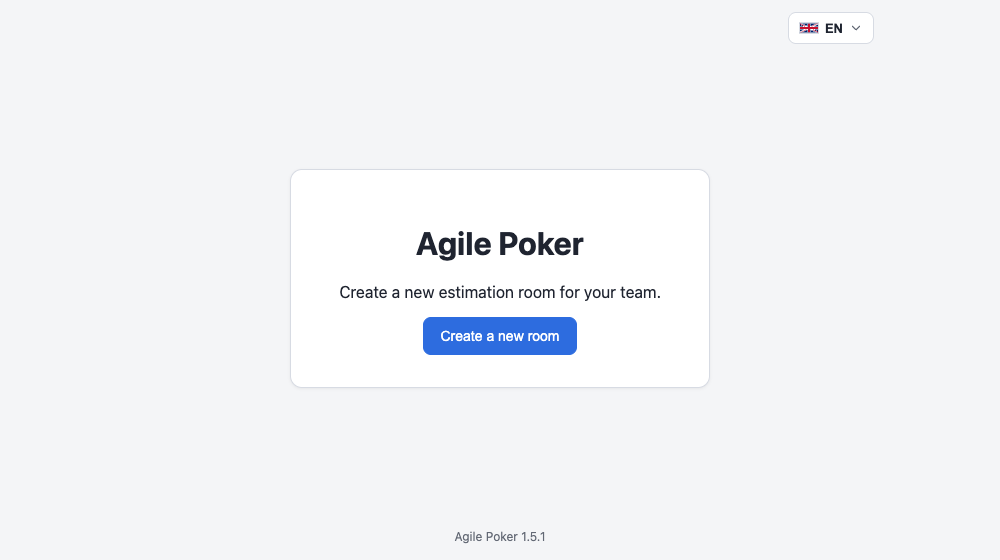
- Open yourdomain.com/poker/ (or the configured base path) and click "Create a new room".
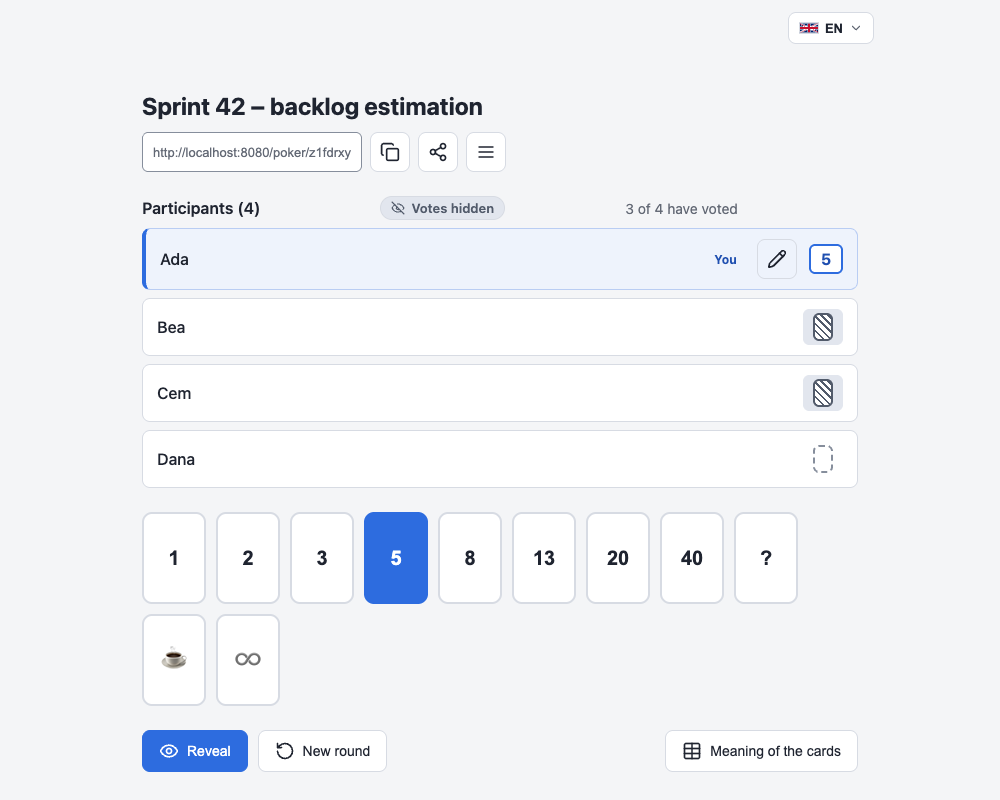
- Copy the room link with the icon next to the link field and share it with your team; a short message at the bottom confirms the copy. Anyone who knows the link can join without logging in. Where supported, the additional Share icon opens the system dialog (e.g. messenger or mail).
- On your first visit, enter your name and click "Enter room". The name is remembered in the browser and can be changed with the pencil icon next to your own entry.
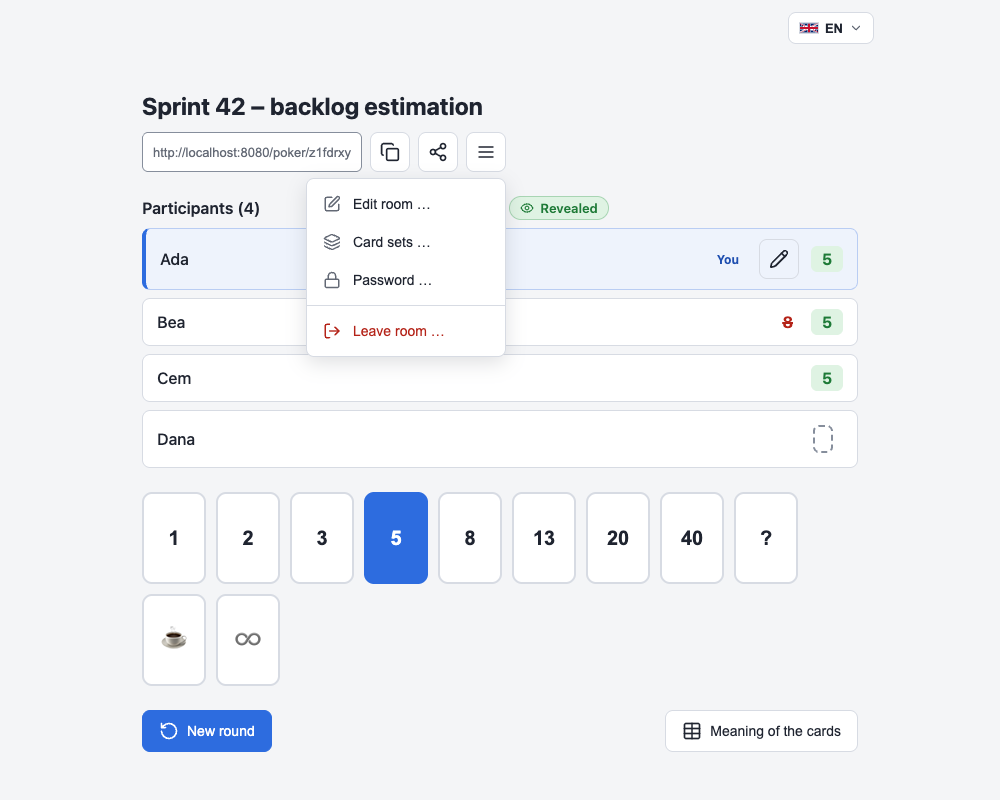
- Pick a card. The others only see that you have voted, not which value. Clicking it again withdraws your vote. Your entry comes first with a “You” badge; before revealing, your card is only visible to you. Card backs indicate hidden votes, dashed slots indicate missing votes. Before revealing, the section header shows how many participants have voted.
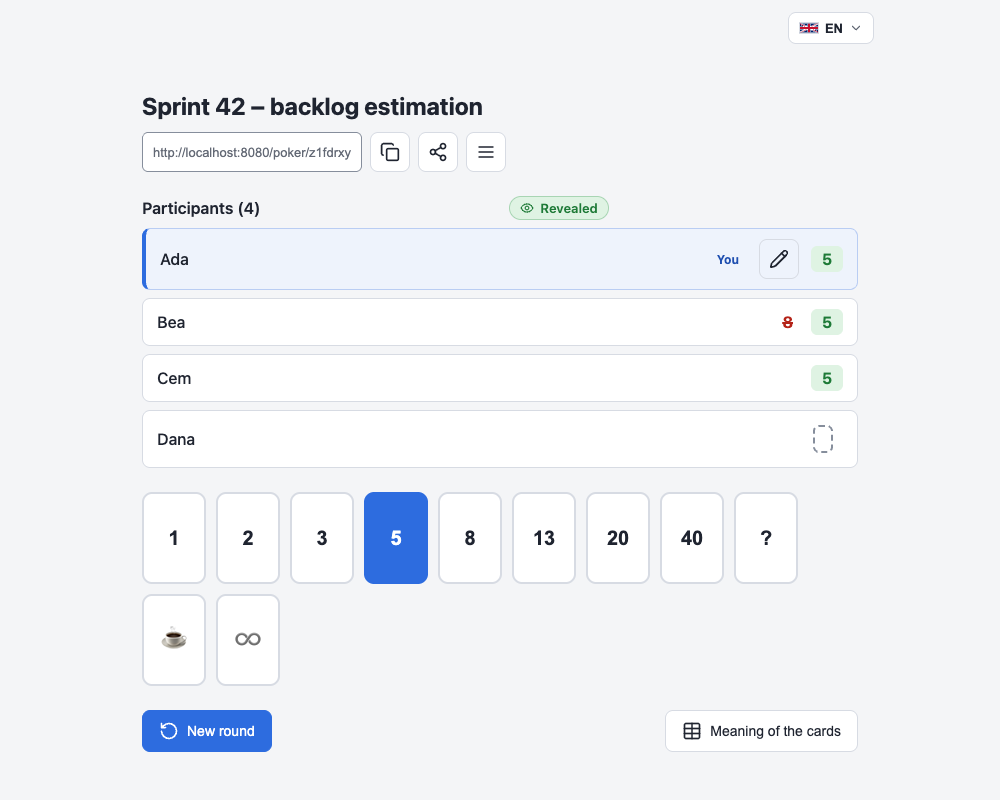
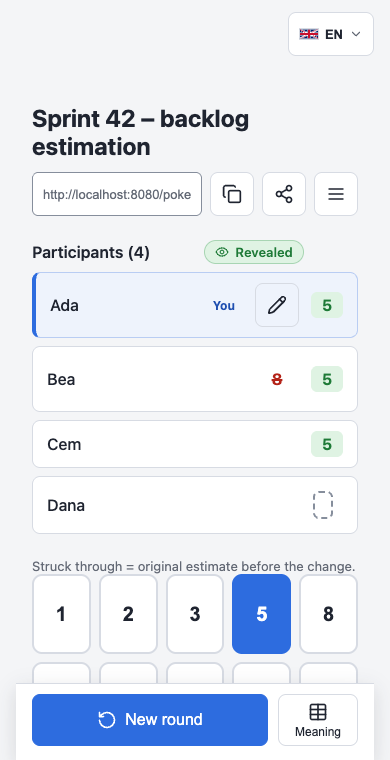
- When everyone has voted, click "Reveal" and confirm: now everyone sees the estimates. If someone changes their estimate afterwards, the original value stays visible, struck through (on smartphones a note below the list explains the strike-through).
- Start a new round with "New round"; all estimates are deleted.
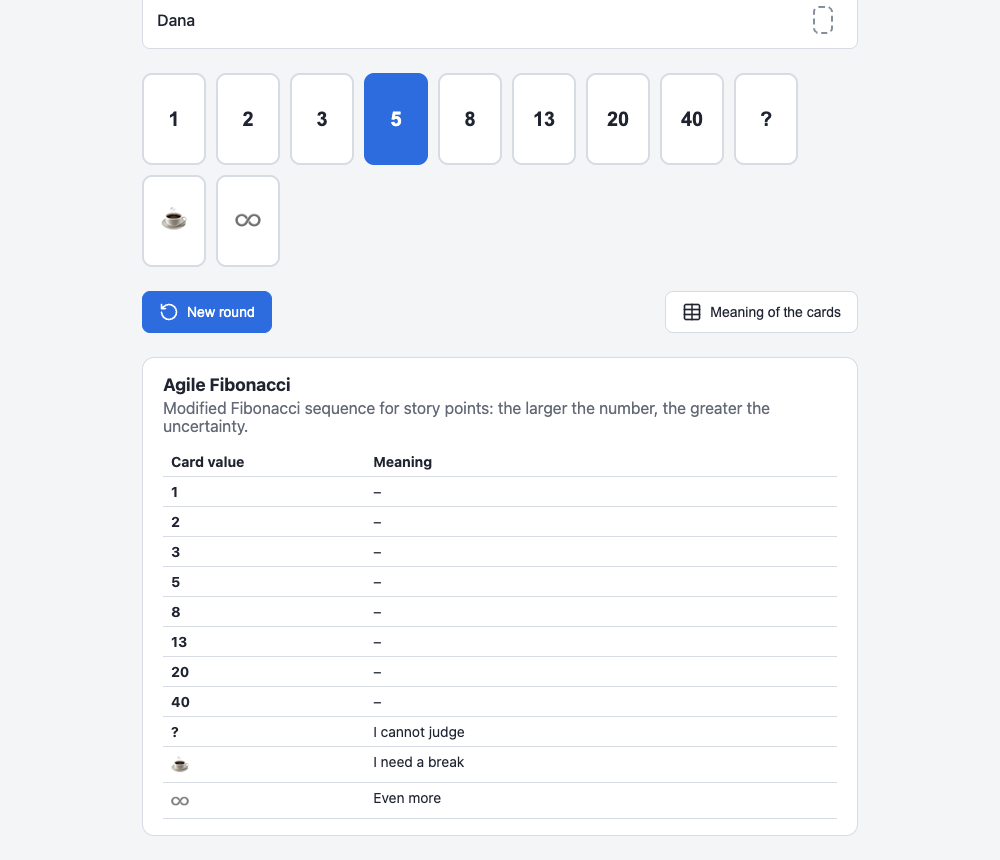
- "Meaning of the cards" in the action bar shows what the cards mean (e.g. ☕️ = "I need a break").
- The menu icon at the top right lets you set the room's title, card set and a password. Editing opens below the header; Close, Cancel or Escape return you to the menu. You can also leave the room after a confirmation. A lock with "Password protected" next to the room title marks a protected room. The language button at the top right (flag with the code "DE" or "EN") switches between German and English; in its menu, the active language is marked with a check mark.
A brief message confirms successful saving of the room title or card set.
On phones, lists with nine or more people start collapsed. Your own row stays visible; “Show all” expands the list and “Show less” collapses it.
Screenshots
For site owners
Agile Poker runs on your own WordPress site: rooms and estimates stay in your database, and no external services are embedded. You need WordPress 7.0 or newer and PHP 7.4 or newer; permalinks must be enabled (Settings → Permalinks, not "Plain").
All settings are under "Settings" > "Agile Poker":
- Base path: address of the plugin pages (default:
poker, i.e. yourdomain.com/poker/). - Maximum number of rooms (default: 100): if more rooms are created, the one inactive for the longest time is deleted.
- Maximum number of participants per room (default: 20, at most 50).
- Maximum simultaneously active rooms (default: 10): caps the server load. When the limit is reached, a room in which nobody has worked for an hour is disconnected; its participants reconnect with one click. If all rooms are actively used, a notice is shown.
- Delete inactive rooms after (default: 90 days).
- Rooms only for logged-in users: new rooms can then only be created by logged-in WordPress users; joining remains possible without an account.
- Default color scheme (Light, Light blue, Dark, Red or Orange): applies to everyone who has not chosen a color scheme in the room; a personal choice takes precedence and is kept in the browser.
- Remove all data when the plugin is deleted (default: off): see "Updates" and "Security notes".
- Footer links: coffee link to support the plugin author and author credit with a link to his LinkedIn profile in the footer of the rooms (can be switched off together).
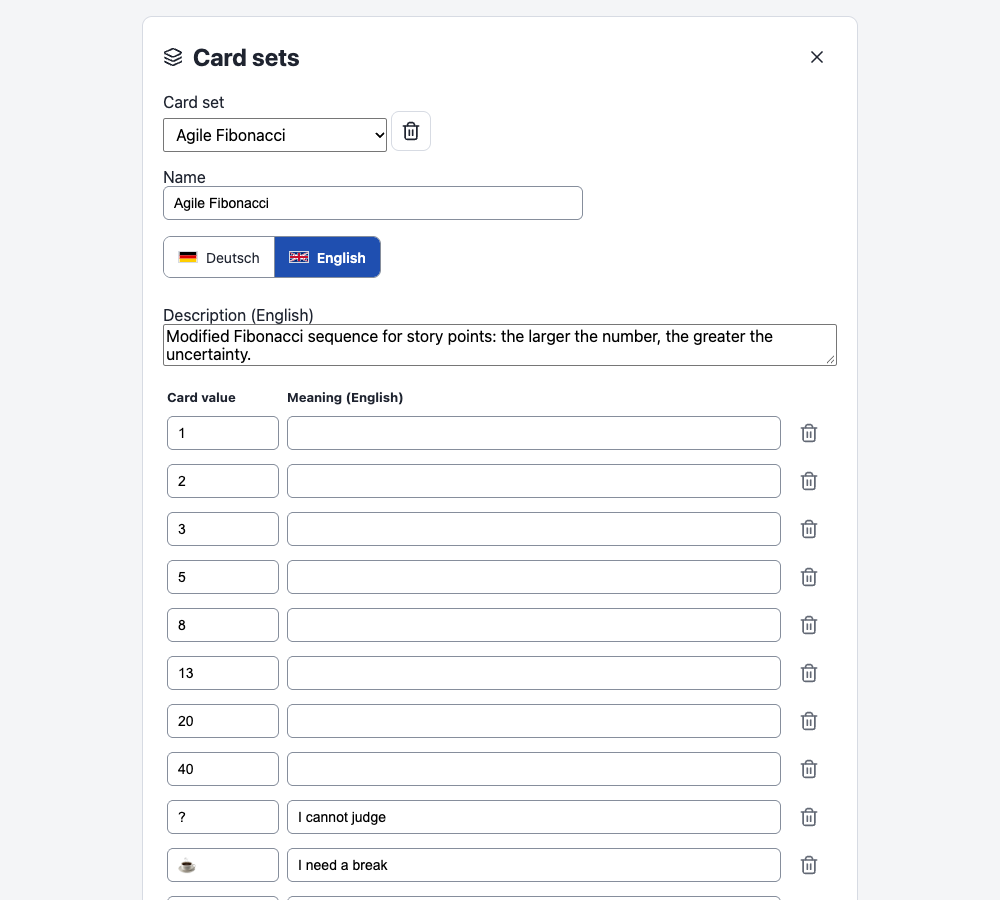
- Card sets: maintain the standard card sets for all rooms (name, description and meanings in German and English) and choose the card set for new rooms. Language segments switch descriptions and meanings; bin icons and a row counter help with editing. Errors appear at the affected field; a dialog asks for confirmation before deletion.
How much a server can handle: every open room checks for changes once per second (background tabs every 15 seconds). A small server with four PHP processes handles about 130 simultaneously active people across all rooms; more PHP processes handle correspondingly more. The setting "Maximum simultaneously active rooms" caps the number of rooms that load the server at the same time; when choosing hosting, still plan for the number of teams estimating simultaneously.
How to install and update the plugin is described under "Installation" and "Updates"; what it means for security and privacy under "Security notes" and "Privacy".
Installation
- Upload the plugin ZIP under "Plugins" > "Add New" > "Upload Plugin" and activate it.
- Check and save the settings under "Settings" > "Agile Poker" (overview under "For site owners"). After installation, new rooms use the card set "Agile Fibonacci".
- If the page shows a 404 error after saving: under "Settings" > "Permalinks", click "Save Changes" once to regenerate the permalink rules.
- Open yourdomain.com/{base-path}/ to create a new room and share the link with your team.
Updates
The plugin is distributed via memetisch.de, not via the WordPress.org directory. It still announces new versions itself: WordPress asks memetisch.de at most every 12 hours, and when a newer version is available, "Update available" appears under "Plugins" as usual and the update can be installed with one click.
When "Settings" > "Agile Poker" is opened, the plugin additionally checks right away (at most every 10 minutes, any time with "Check again") whether a new version is available. If so, the page shows the version, a link to details and changelog and the button "Update now". Anyone who may not update plugins on the website gets a download link for the ZIP file instead.
The following applies:
- Only the technically necessary request to https://memetisch.de/wp-json/agile-poker-central/v1/update.json is sent, without any information about the website, users or participants (own user agent "AgilePoker/x.y.z"). The same applies to downloading the update package from memetisch.de.
- Version information and update package are only accepted via HTTPS from memetisch.de; other addresses are rejected.
- If memetisch.de cannot be reached, nothing else happens: the result is cached for one hour, and wp-admin stays fast.
Updating manually (e.g. without internet access on the server):
- Deactivate and delete "Plugins" → "Agile Poker". This only removes the plugin files – rooms, participants and settings are kept, as long as "Remove all data when the plugin is deleted" (Settings) is off. If it is on, deleting also removes all rooms.
- Under "Plugins" → "Add New" → "Upload Plugin", upload the new ZIP file (download link on memetisch.de) and activate it.
If the new version changes the database schema or rewrite rules, this is applied automatically on the next page request.
Security notes
Accessing a room does not require a WordPress login – anyone with the link can join and edit the room title/card set. The protection lies in the random, hard-to-guess room slug. For an internal team tool, this is a deliberate trade-off in favour of simplicity.
In addition, every room can get a password via the room menu → "Password"; a lock with "Password protected" next to the title marks it in the room. Anyone opening the room page afresh then has to enter it and sees no room data before (not even the title); anyone who was already in the room when it was set keeps access, as does every browser in which it has been entered once. The protection also applies to the REST API. The password is only stored as a WordPress password hash; wrong attempts are limited to 10 per 15 minutes per IP address and room. Anyone with access can change or remove the password; existing access remains valid when it is changed. If a password has been passed on, "Sign out everyone else" ends all previous access when setting or changing it: everyone else is removed from the room (their estimates for the current round are lost) and has to enter the new password.
The endpoint for creating new rooms (POST /wp-json/agile-poker/v1/rooms) is technically publicly reachable (not only for team members with a room link), as it has to work without login. It is therefore limited to 20 new rooms per hour per IP address, so that it cannot be flooded automatically to push out active rooms via the rotation limit. Access to other WordPress data or to wp-admin is not possible via this plugin – in case of abuse, only the plugin's own two tables would be affected.
If you want to prevent strangers from creating rooms at all (and pushing out existing rooms via the room limit), switch on the option "Rooms only for logged-in users" under "Settings" > "Agile Poker". Then only logged-in WordPress users can create new rooms; everyone else sees a login link on the page. Joining, voting and all other actions in a room remain possible without an account.
Further limits against abuse via a forwarded room link:
- By default a room holds at most 20 participants (configurable up to 50). Anyone already in the room can rejoin or change their name at any time.
- Joining, voting, revealing, resetting, leaving and editing are limited to 300 actions in 5 minutes per IP address. A team of 20 people behind a shared IP address does not notice this; fetching the room state is not limited.
- Rooms in which nobody has been active for 90 days (configurable) are deleted automatically together with their participants.
- By default at most 10 rooms are connected to the server at the same time (configurable). A room counts as actively used if someone joined, voted, revealed or changed something in the last hour. When the limit is reached and another room is created or opened, the plugin disconnects a room in which nobody has worked for over an hour: its participants see "Connection inactive" and can reconnect with one click. If all rooms are actively used, a clear notice is shown. This caps the server load.
When the plugin is deleted (not just deactivated), the database tables are kept by default, so that removing it by mistake does not destroy any room data. To remove the plugin completely, turn on "Remove all data when the plugin is deleted" under "Settings" > "Agile Poker" beforehand: deleting the plugin then removes wp_agile_poker_rooms, wp_agile_poker_participants and all options and caches of the plugin. Warning: the update route described above ("Deactivate, delete, upload the new ZIP") then also deletes all rooms; updates via "Update now" are not affected. On multisite installations each site's own option decides; deactivating never deletes data.
Privacy
Agile Poker only stores in the website's database what is needed for the estimation round: room title and card set (including card sets created in the room), the participants' display names, their estimates (after revealing also the originally revealed one if it is changed) and a random identifier of the browser; of a room password only a hash. Name and identifier are also kept in the browser's localStorage, as is an access token for password-protected rooms, a language choice that differs from the browser language, and a chosen color scheme. No cookies are set and no external services are embedded.
For the rate limits, a hash of the IP address is stored briefly (at most one hour). Participants are deleted when they leave the room, at the latest one hour after their last activity, and together with the room; rooms after the configured number of inactive days (default: 90) or via the room limit.
For the update check, the server asks memetisch.de for a new version at most every 12 hours and when the Agile Poker settings are opened (there at most every 10 minutes) (see "Updates"); no visitor data is transmitted. If an administrator opens the details of a new version under "Plugins", they are also retrieved from memetisch.de (at most every 12 hours per language), again without any visitor data.
The plugin adds a suggested text for the privacy policy under "Settings" > "Privacy" > "Policy Guide". It is meant as a suggestion and must be adapted to your own website.
Third-party components
- Icons: Lucide (https://lucide.dev), licence ISC. Copyright (c) for portions of Lucide are held by Cole Bemis 2013-2022 as part of Feather (MIT). All other copyright (c) for Lucide are held by Lucide Contributors 2022. The icons are included as SVG directly in the plugin; no external resources are loaded.
Changelog
1.8.0
- Small animations: cards flip over one after another when revealed, the chosen card lifts, your own vote and new participants fade in; dialogs, menus and panels appear smoothly. With the system setting "Reduce motion" everything appears instantly.
- The plugin pages have their own favicon (playing card on blue, SVG with PNG fallback and Apple touch icon) without changing the website's favicon.
- Suggested privacy policy text (Settings → Privacy): note on the color scheme kept in the browser added.
- Five color schemes (Light, Light blue, Dark, Red, Orange): everyone picks their own with the palette button next to the language switch; site owners set a default scheme in the settings.
- The "Create a new room" page shows a header image with the logo and a team scene (WebP with JPEG fallback, decorative, scales to the screen).
1.7.0
- New setting "Maximum simultaneously active rooms" (default 10) caps the server load: rooms without work in the last hour are disconnected, their participants can reconnect with one click; if all slots are actively used, a clear notice is shown.
- New option "Remove all data when the plugin is deleted" (default: off): deleting the plugin then cleans up tables, options and caches.
- You can choose the address of a room yourself: when creating it (optional) and later under “Edit room”. If others are in the room, Agile Poker asks before changing it; the previous link stops working afterwards.
1.6.0
- Where supported, the new Share button opens the system share dialog; cancelling stays silent and other errors fall back to copying the link.
- From nine people onwards, the participant list uses columns on wide screens and can be expanded on phones; long card values and emoji scale to fit.
- On smartphones, cards use a five-column grid; join, password and notice cards appear at the top with more room for the onscreen keyboard.
- Before revealing, the section header shows how many participants have voted. When everyone is ready, screen readers announce it once per round.
- Editing panels for room title, password and card sets open directly below the header. Only one panel stays open; Close, Cancel and Escape return focus to the room menu.
- Labelled actions and a round phase indicator: After revealing, “New round” becomes the main action. On smartphones the action bar stays at the bottom; keyboard focus follows the new main action.
- Participant list: your entry comes first with a “You” badge, card backs for hidden votes and empty slots for missing votes. Before revealing, your card has an outline and is only visible to you.
1.5.1
- Downloading updates from memetisch.de no longer sends the website address and is therefore no longer blocked by the server firewall ("Download failed. Forbidden").
1.5.0
- VoiceOver announces repeated copy confirmations again, including consecutive clicks.
- Room creation errors are reported in a persistently rendered live region.
- Password checks and save buttons show a loading spinner during requests.
- Saving a room or card set is confirmed by a brief success message.
- Footer links announce a new window to screen readers.
- Admin card set management with language segments, bin icons, a row counter, field-specific errors and a translated delete dialog.
- Card set errors: screen readers read only each marked field's own error message instead of the entire error list.
- Visible password protection: a lock with "Password protected" appears next to the room title while a password is set. Changes are also shown automatically to the other participants.
- Room footer: with the English interface, all footer texts appear in English. The coffee link is shorter ("Buy me a coffee ☕"), and next to it there is a credit to the author ("Built with Claude Code by Tim") with a link to his LinkedIn profile. Both links can be switched off together under Settings → Agile Poker and do not pass on the room URL; the suggested privacy policy text mentions both.
- Consistent colours: error texts use the same red everywhere, and the hover background of menu items and buttons is easier to see.
- Icon buttons consistently measure 40 × 40 px on desktop; on touch devices, their targets remain at least 44 × 44 px.
- Settings → Agile Poker: in the version check box, "Update now" (or "Download ZIP") and "Check again" sit side by side and wrap cleanly on narrow screens.
- Language selection: the button at the top right shows the language code ("DE" or "EN") and an arrow next to the flag, and the active language has a check mark in the menu. Flags stand for countries; the code makes the language unambiguous.
- Confirmations in a dialog of their own instead of the browser prompt: Reveal, New round, Remove password, Sign out everyone else and deleting an own card set ask in the selected language. The button names the consequence (e.g. "Reveal", "New round"), irreversible actions are red. Focus starts on "Cancel", Escape closes the dialog. On smartphones it appears at the bottom of the screen with full-width buttons.
- "Leave room …" now asks before your estimate is removed. In the room menu the entry is set apart by a line, red and with an icon.
- Room menu: every entry has an icon, and entries that open a section or a confirmation end in "…". The focus outline is no longer cut off at the menu edge, and on smartphones the entries are larger (48 px).
- Messages and input errors: errors, warnings and the notice about a lost connection each have their own icon, so they no longer differ by colour alone; an X icon closes messages. Errors in an input (e.g. empty name, wrong password, passwords do not match, invalid card set) appear right at the field, the field gets a red border and screen readers read the message with the field. An empty name when entering the room now shows a hint.
- Visible feedback: after "Copy link" and after saving or removing the password, a short message appears at the bottom for 2 seconds (e.g. "Link copied. Now share it with your team."); it stays while the mouse rests on it. On smartphones and tablets a note below the participant list explains the struck-through value ("Struck through = original estimate before the change."), and the struck-through value is easier to tap.
- Card sets in the room: the language of description and meanings is chosen with a switch whose active half is filled dark blue. Rows are deleted with a bin icon instead of "−", "Add row" has a plus icon, and a counter shows "n of 20 rows". The "Card value" column has a fixed width so the meanings get more room on smartphones.
- Loading states: until a room has opened, it shows "Loading room …" with a spinner. "Create a new room" shows "Creating room …" while the request is running, "Enter room" shows a spinner; neither can be triggered twice in the meantime. With reduced motion enabled, the spinner does not rotate.
1.4.0
- Less server load: if a room is only open in the background (tab not visible), it checks for changes only every 15 seconds and immediately when you switch back. Unchanged room states are not transferred again.
- A room's own card sets can be deleted again via the bin icon in the card set configuration; if an own set overrides a standard set, the standard applies again afterwards.
- Password protection: when setting or changing the password, "Sign out everyone else" ends all previous access.
- Settings > Agile Poker checks for a new version when opened and offers it with "Update now" (as a download link without permission to update). The suggested privacy policy text mentions the additional request.
- Changes by others appear faster: rooms check every second instead of every 1.5 seconds (background tabs still every 15 seconds).
- Participants per room: default 20 instead of 50, at most 50; the settings page states the approximate capacity of a small server.
1.3.1
- The documentation is now also available in English (readme-en.txt).
- New: quick start guide for participants, a section for site owners covering all settings, and screenshots in German and English.
- Under Plugins, "View version details" now shows description, installation, screenshots and changelog from memetisch.de instead of an empty window (no request to wordpress.org). The suggested privacy policy text mentions this request.
1.3.0
- The suggested privacy policy text (Settings → Privacy) now starts directly with the text to copy, without an introductory note.
- Fix: In Safari on iPhone and iPad, card values appeared blue instead of in the normal text colour.
- If too many rooms were created from one network in the last hour, the "Create a new room" page now explains this instead of just showing "Please try again".
- Accessibility: When someone renames themselves in a room, screen readers announce "X is now called Y" instead of "X left the room. Y joined the room." Participants with the same name are told apart correctly.
- The update check now queries the distribution on memetisch.de at /wp-json/agile-poker-central/v1/update.json (previously a static file). Still only via HTTPS from memetisch.de and without data about the website.
- Tidier room page: "Edit room" and "Leave room" now live in the room menu (icon with three lines at the top right). Voting, revealing and resetting remain directly reachable. The menu can be used with the keyboard (Escape closes it) and is labelled for screen readers.
- Space-saving buttons: "Copy link", "Change name" and "Reset" show an icon instead of text. The former text appears as a tooltip (on hover and keyboard focus, Escape hides it) and remains the button's name for screen readers. After copying, the icon briefly changes to a check mark, and screen readers announce "Link copied."
- Card sets with meanings: after installation, the card sets "Agile Fibonacci" (1, 2, 3, 5, 8, 13, 20, 40, ?, ☕️, ♾️), "T-Shirt", "Standard Fibonacci-Shirts" and "Delegation Poker" are available, with meanings of the card values in German and English. New rooms use "Agile Fibonacci". The setting "Default card set" is gone; existing rooms keep their cards.
- A card set has at most 20 cards (previously 30).
- Translatable: all texts of the plugin pages, the settings and the messages use the text domain "agile-poker". A translation template is available at languages/agile-poker.pot. Without a translation everything stays in German as before.
- Choose a language: the plugin pages are available in German and English. The language follows the browser settings (otherwise English); the flag at the top right switches it. Only a choice that differs from the browser language is stored in the browser. Messages from the server also appear in the chosen language.
- Manage card sets: under Settings → Agile Poker, section "Card sets", the standard card sets for all rooms can be created, edited (name, description and meanings in German and English, add and delete rows) and deleted, and the default for new rooms can be chosen. Rooms without their own card set pick up changes immediately; if a card set is deleted, rooms keep their cards.
- Password protection for rooms: via the room menu → "Password", a password can be set, changed and removed. New visitors then only see a password prompt; anyone already in the room keeps access, and a browser needs the password only once. The protection also applies to the REST API (see "Security notes").
- Suggested privacy policy text (Settings → Privacy) extended: card sets created in a room, password hash of protected rooms, and access token and a differing language choice in the browser. Copy the text into your own privacy policy.
- Card sets in the room: via the room menu → "Card sets", a room chooses one of the standard card sets or creates its own table. Name, description and meanings can be edited per language, rows added and deleted. Changes to a standard card set only apply to this room. "Edit room" now only changes the title; cards are maintained exclusively via the card sets.
- Look up the meaning of the cards: a button with a table icon below "Reveal" shows a table with the card values and their meanings (e.g. ☕️ = "I need a break"). It stays open while the room updates and is marked up as a table for screen readers.
1.2.0
- The footer of every room contains a link to support the plugin author ("Like Agile Poker? Buy me a coffee ☕", PayPal). It loads no external content, does not pass on the room URL and can be switched off for all rooms under Settings → Agile Poker.
- Security: the plugin's pages are protected against being embedded in other sites (clickjacking), allow only their own scripts, styles and connections via Content Security Policy, do not pass the room URL to other websites as referrer and are not indexed by search engines.
- "Copy link" now always gives feedback: if the browser refuses access to the clipboard, the link is copied another way; if that fails too, the link is selected and a note asks to copy it manually.
- WordPress 7.0 or newer is now required (previously stated: 5.8, but never checked). Tested with WordPress 7.0 and 7.1, PHP from 7.4.
- Better display on smartphones: no more horizontal scrolling with long names, long room titles or narrow screens (from 320 px), "Copy link" stays on one line, and buttons, cards and input fields are at least 44 × 44 px on touch devices. The view on a computer is unchanged.
- Accessibility: screen readers announce when someone joins or leaves the room and when cards are revealed or reset. Cards report whether they are selected, and each person's voting status is available as text ("has voted, hidden", "no vote yet", "Estimate: 5"). Keyboard use shows a clear focus outline, and focus is kept during updates. Contrasts were raised to WCAG 2.1 AA (footer, hidden votes, input field borders).
- Your own name can now be changed directly in the room ("Change name" next to your own entry). Your estimate is kept, and the new name also applies to future rooms in this browser.
- New: "Leave room". You disappear from the others' participant list together with your estimate immediately (instead of only after one hour of inactivity); you can then rejoin the room with one click.
- "Edit room": while the dialog is open, participants, votes and revealing keep updating. If someone else has changed the title or cards in the meantime, nothing is silently overwritten on saving anymore: a note shows the current values, and you can save or discard your own changes anyway.
- Anyone who changes or withdraws their estimate after revealing is marked visibly for everyone: next to the current estimate, the value chosen when revealing is shown in red and struck through (or "–" if there was no estimate before), with the hint "original estimate". Returning to the original value removes the mark; "Reset" removes it. The database is adjusted automatically on update.
- Protection against abuse: a room holds at most 50 participants, actions in a room are limited to 300 in 5 minutes per IP address, and rooms not used for 90 days are deleted automatically. Number of participants and retention period can be changed under Settings → Agile Poker. When a limit is reached, a message in the room explains what is going on.
- Privacy: the plugin adds a suggested text for the privacy policy to the guide under Settings → Privacy (which data is stored, where, why and for how long). The readme.txt has a "Privacy" section.
- New option "Rooms only for logged-in users" (Settings → Agile Poker, default: off): then only logged-in WordPress users can create new rooms, everyone else sees a login link. Joining and taking part remain possible without an account.
- Updates directly in WordPress: the plugin is distributed via memetisch.de and announces new versions itself ("Update available" under Plugins, update with one click). The check runs at most every 12 hours, sends no data about the website and only accepts updates via HTTPS from memetisch.de.
1.1.0
- Consistent name "Agile Poker" on all pages: the browser tab is called "Agile Poker – <room title>" (or just "Agile Poker" as long as the room has no title of its own) – already when the page loads and after renaming without reloading; the other pages are called "Agile Poker – Create a new room" and "Agile Poker – Room not found". New rooms get "Agile Poker" as default title (previously "Planning Poker").
- The footer of all plugin pages now shows the plugin version (e.g. "Agile Poker 1.1.0") – helpful for error reports and after updates.
- "Reset" now asks first, so that an accidental click does not delete the whole team's estimates.
- Errors are now shown instead of silently ignored: if an action fails, a message appears; if joining fails, there is "Try again" instead of an endless "Loading …"; during longer connection problems a note appears and disappears by itself; if the room was deleted, this is shown (with a link to create a new room). Messages are also read out by screen readers.
- Room links with capital letters (e.g. from autocorrect) now lead to the room instead of a 404 page.
- Room titles, names and cards are stored and shown as entered: angle brackets are no longer lost (e.g. "Retro & <Planning>") and no longer appear as "<" (e.g. "Effort <5 days"); cards like "<1" are possible. Line breaks become spaces, titles are limited to 255 characters.
- Card sets follow the same rules in the settings and when editing a room: at most 30 cards with at most 10 characters each. Cards that are too long are no longer shortened but left out – in both places a note shows which cards were not applied (in the settings in addition to the message "Settings saved").
- "Maximum number of rooms" now only accepts whole numbers from 1. Previously, e.g. 0 was saved (silently switching off the automatic clean-up) or -5 converted to 5; now an error message appears and the previous value is kept.
- Fix: a double click on "Reveal", "Reset", "Enter room" or "Save" now triggers the action only once – the button is locked while the action runs and is released again on error. This also means no second confirmation dialog when revealing.
- Fix: after revealing (or your own vote), the display no longer briefly jumps back to the old state when an older update from the server arrives late.
1.0.3
- Fix: participants wrongly disappeared from the list when their browser tab was inactive or in the background for more than 20 seconds (e.g. while discussing the results) – browsers throttle background tabs so much that the heartbeat stopped. The threshold after which a participant counts as "left" is now 1 hour instead of 20 seconds.
1.0.2
- Performance: each poll request used to run up to 2 additional database reads that were unnecessary in this case. In addition, all participants of a room updated the same room row and cleaned up stale entries independently on every poll – this now runs bundled at most once every 10 seconds per room. Noticeably reduces the database load with several teams active at the same time, without any noticeable difference for users.
1.0.1
- Security hardening: quotation marks in card values are now also escaped correctly in HTML attributes in the frontend (prevents theoretical attribute injection if someone saves a card value with
"). - Rewrite rules are now reliably rewritten when the settings are saved for the very first time (previously only on changes to an existing option).
- Rate limit for creating new rooms (20/hour/IP) against abuse of the publicly reachable endpoint.
1.0.0
- First version.